


Our approach to cable care follows the same principles as our approach to cable design: prioritise what is measurable and repeatable. A well-made cable requires very little maintenance. What it does require is correct handling, sensible storage, and an understanding of how connectors behave over time. This guide covers everything we are asked about regularly.
Cleaning and Contact Care
How should I clean connectors?
Wipe contact surfaces with a clean, dry microfibre cloth. For recessed areas inside XLR or jack connectors, a short burst of compressed air removes dust and fibre. Do not use abrasives, metal brushes, or household solvents. The goal is to remove surface contamination without disturbing the plating.
What about oxidized RCA or jack connectors?
For connectors showing visible oxidation or tarnish, apply a small amount of DeoxIT D-Series contact cleaner to the contact surfaces. Insert and withdraw the connector several times to work the solution across the mating surfaces, then wipe away any residue with a dry cloth. DeoxIT dissolves oxides and leaves a thin protective film. A single application typically lasts months.
Does plating type matter for cleaning?
Yes. Gold-plated connectors resist oxidation and rarely need more than a dry wipe. Gold does not tarnish under normal conditions, which is one reason it remains the standard plating for high-quality audio connectors. Silver-plated connectors offer marginally better conductivity but oxidize more readily, especially in humid environments. Periodic cleaning with DeoxIT keeps silver contacts performing at their best. Rhodium-plated connectors behave similarly to gold in terms of corrosion resistance.
Can I use isopropyl alcohol?
Isopropyl alcohol at 90% concentration or higher is suitable for cleaning connector bodies, shells, and non-contact surfaces. It evaporates cleanly and leaves no residue. However, IPA is not a substitute for DeoxIT when dealing with oxidized contact surfaces. IPA removes surface contamination but does not dissolve oxide layers or leave a protective film. Use DeoxIT for contacts, IPA for everything else.
Handling and Connection
What is the correct way to disconnect a cable?
Always grip the connector body, never the cable itself. Pulling by the cable places strain directly on the solder joints and strain relief inside the connector. Over time, this is the single most common cause of cable failure. It applies to every connector type without exception.
How tight should locking connectors be?
Finger-tight only. This applies to Neutrik speakON, BNC, and threaded coaxial connectors. Excessive force does not improve the electrical connection. It degrades the socket contacts over time and makes future removal more difficult. If a connector does not seat properly with normal finger pressure, check for alignment or debris.
Should I leave cables permanently connected?
Yes, where practical. Permanent connections are preferable to frequent insertion and withdrawal. Connector wear occurs during mating cycles - each insertion and withdrawal removes a microscopic amount of plating material. A cable that stays connected for years experiences essentially zero contact wear. If you regularly swap cables for comparison, allow connectors to settle for a few minutes before critical listening.
How should I insert an XLR connector?
Align the connector with the socket keyway and push firmly until the latch clicks into place. The click confirms full engagement. To disconnect, depress the latch fully before pulling. Never force an XLR connector sideways or yank it without releasing the latch - this damages both the plug pins and the socket contacts.
Any special considerations for RCA on high-end equipment?
Use a straight, even pull when disconnecting. Do not rock the connector side to side, as this stresses the centre pin and can widen the socket over time, reducing contact pressure. When inserting, push straight in until the connector seats firmly. If the fit is unusually loose, the socket may need attention - not the cable.
Storage
How should I store cables that are not in use?
Coil cables loosely using the over-under technique. Avoid tight coiling, sharp bends, or kinking. Do not hang cables from a single point, as gravity concentrates stress at that point. Lay coiled cables flat or place them in a drawer or case. Protective caps on connectors prevent mechanical damage and contamination during storage.
What is the over-under coiling technique?
Over-under coiling alternates the direction of each loop - one loop over the hand, the next under. This prevents the cable from developing twist memory, which causes it to spring and tangle when uncoiled. It is the standard method used by professional audio engineers and broadcast technicians worldwide. Once learned, it becomes automatic and adds no time to the process.
Where should cables be stored?
In a cool, dry environment, away from direct sunlight and heat sources. UV exposure degrades some jacket materials over time. Keep signal cables separate from mains cables during storage - not because of electromagnetic interference during storage, but because it establishes good practice and prevents accidental tangling with heavier, stiffer power cables.
Velcro ties or plastic cable ties?
Velcro, always. Plastic cable ties are easy to over-tighten, and an over-tightened tie creates a permanent deformation in the cable jacket and can compress the conductors beneath. Velcro ties apply even, gentle pressure and are reusable. They are the professional standard in studio, broadcast, and live sound environments for good reason.
Installation and Routing
Proper routing is one of the most overlooked aspects of system setup. It costs nothing and can prevent problems that are otherwise difficult to diagnose.
Separation between mains and signal cables
Maintain at least 20 cm of separation between mains power cables and signal cables for any parallel run. Where cables must cross, arrange the crossing at 90 degrees and keep it as brief as possible. This minimises electromagnetic coupling from the 50/60 Hz mains field into sensitive signal paths. The rule applies most critically to analogue interconnects, phono cables, Ethernet, and data cables. Balanced lines (XLR) offer better rejection of induced interference but still benefit from sensible separation.
Cable length considerations
For analogue interconnects at typical domestic lengths (1-3 metres), cable length has negligible effect on signal quality. For speaker cables, resistance increases with length and decreases with conductor cross-section - keep runs as short as practical, and use adequate gauge for longer distances. For digital cables (S/PDIF, AES/EBU, word clock), impedance matching matters more than length within normal runs, though very short S/PDIF cables (under 0.5 m) can cause reflections. USB cables should remain under 5 metres without active extension. Ethernet cables can run up to 100 metres within specification.
Running cables through walls and under floors
Cables can be installed through walls, under floors, or in conduit provided they carry appropriate ratings. Use CL2 or CL3 rated cables for in-wall installation where local codes require it. Avoid sharp bends at entry and exit points. Leave service loops at each end so the cable can be re-terminated if needed without pulling new cable. Label both ends clearly.
Connector-Specific Guidance
XLR
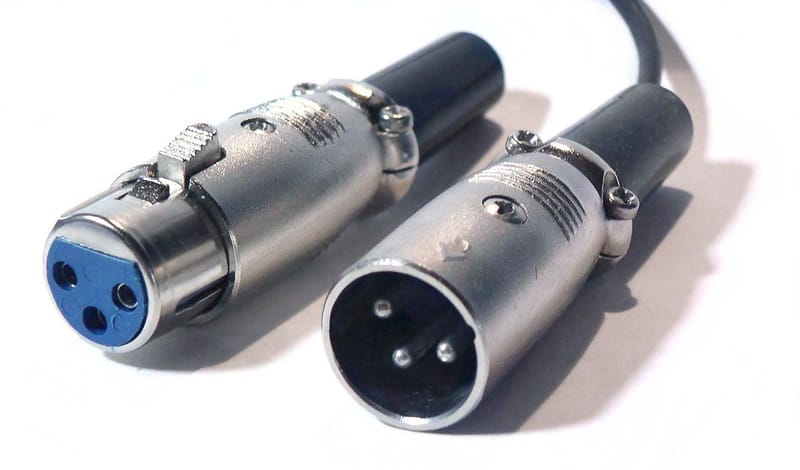
XLR connectors are the most robust connector type in audio. The locking mechanism prevents accidental disconnection, and the balanced pin configuration provides excellent noise rejection. Keep the latch mechanism clean and free of debris. If a latch becomes stiff, a small amount of silicone lubricant on the release button restores smooth operation. Do not lubricate the contact pins.
RCA
RCA connectors rely on friction fit and spring tension for both mechanical retention and electrical contact. Over many insertion cycles, the outer ground contact can lose tension. If an RCA plug feels loose in a socket, the issue is usually socket fatigue rather than the plug. High-quality RCA connectors with split centre pins maintain better long-term contact pressure than solid pin designs.
6.35 mm Jack (TRS/TS)
Jack connectors are mechanically simple but prone to intermittent contact if the socket's internal spring contacts weaken. Insert and withdraw straight, without rotation. If a jack connection develops crackling, clean both plug and socket contacts with DeoxIT before assuming a cable fault. Locking jack connectors (Neutrik) are preferred for permanent installations.
BNC
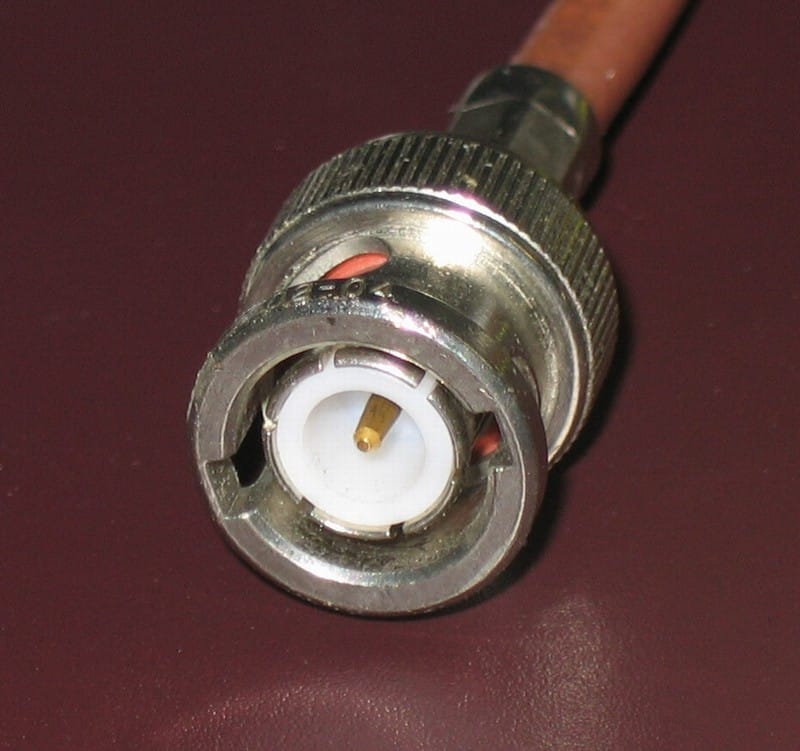
BNC connectors are used for word clock and some digital connections. The bayonet locking mechanism provides a secure, impedance-controlled connection. Quarter-turn to lock, quarter-turn to release. Do not over-rotate. Keep the bayonet slots clean - accumulated dust can prevent full engagement, which degrades the impedance match and increases signal reflections.
USB and Ethernet
USB connectors, particularly Type-B and micro-USB, are not designed for thousands of mating cycles. Minimise unnecessary connection and disconnection. For USB DAC connections, connect once and leave in place. Ethernet RJ45 connectors are more robust but the latch tab is fragile. Press the tab fully when disconnecting. A broken latch means the cable will not stay seated - replace the connector or cable rather than relying on friction alone.
Fault Finding and Longevity
What are the signs a cable needs attention?
Intermittent signal dropout, crackling during playback, loss of one channel, or a sudden increase in hum or noise. These symptoms almost always point to a termination issue - a dry solder joint, a fractured conductor at the strain relief, or a connector with degraded contact surfaces. The cable itself (the conductor and dielectric between connectors) very rarely fails.
How do I identify which cable is causing a problem?
Substitute one cable at a time, starting with the most-handled cable in the chain. Swap the suspect cable for a known good one and check if the problem disappears. If substitution is not practical, gently flex and move the suspect cable while the system is playing at low volume. If the fault appears or disappears with movement, the termination is compromised. Mark the cable for re-termination.
I have hum in my system. Is it a cable fault?
Almost certainly not. Persistent hum at mains frequency (50 or 60 Hz) is nearly always a ground loop - multiple paths to ground creating a loop that acts as an antenna for mains interference. The solution is ground loop correction: identifying the duplicate ground path and breaking it with an isolation transformer, a ground lift adapter, or by restructuring the system's grounding topology. Replacing cables will not resolve a ground loop.
Can a faulty cable be repaired?
Yes. In nearly all cases, the fault is at the termination, not in the cable itself. Re-termination with a new connector restores full performance. This is one of the advantages of high-quality cable construction - the conductor and dielectric last indefinitely, and only the mechanical connection point needs periodic attention. We offer re-termination as a standard service and are happy to repair cables regardless of origin.
How long should a cable last?
A properly constructed cable has no defined service life. The conductor material - whether copper, silver, or alloy - does not degrade under normal conditions. The dielectric (insulation) is chemically stable for decades. Failure, when it occurs, is mechanical: a solder joint fatigued by repeated flexing, a connector worn by thousands of mating cycles, or jacket damage from improper storage. All of these are avoidable with the practices described in this guide, and all are repairable.
We are happy to assist with re-termination, system evaluation, fault diagnosis, and installation advice. Contact us directly.
Frequently Asked Questions
How should I clean audio cable connectors? +
Wipe contact surfaces with a clean, dry microfibre cloth. For connectors showing oxidation or tarnish, apply DeoxIT D-Series contact cleaner sparingly, make and break the connection several times to work it across the mating surfaces, then wipe away any residue.
Gold-plated connectors rarely need more than a dry wipe, as gold does not tarnish under normal conditions. Silver-plated connectors oxidize more readily, especially in humid environments, and benefit from periodic DeoxIT treatment. Avoid abrasives, metal brushes, and household solvents - these damage plating and do more harm than good.
What is the correct way to store audio cables? +
Coil cables loosely using the over-under technique, which alternates loop direction with each wrap to prevent twist memory. This is the standard method used by professional audio engineers worldwide. Avoid tight coiling, sharp bends, or kinking, all of which can deform the conductor geometry and degrade performance over time.
Store cables in a cool, dry environment away from direct sunlight and heat sources. Use velcro ties rather than plastic cable ties - velcro applies even, gentle pressure and cannot be over-tightened. Place protective caps on connectors to prevent contamination and mechanical damage during storage.
How far apart should mains and signal cables be routed? +
Maintain at least 20 cm of separation for any parallel run between mains power cables and signal cables. Where cables must cross, arrange the crossing at 90 degrees and keep it as brief as possible. This minimises electromagnetic coupling from the 50/60 Hz mains field into sensitive signal paths.
This applies especially to analogue interconnects, phono cables, Ethernet, and data cables. Balanced lines (XLR) offer better rejection of induced interference but still benefit from sensible separation. In practice, simply running signal cables along one side of the room and mains along the other solves most routing challenges.
How long should an audio cable last? +
A properly constructed and maintained cable has no defined service life. The conductor material does not degrade under normal conditions, and the dielectric insulation is chemically stable for decades. Failure, when it occurs, is almost always mechanical - a dry solder joint, a connector worn by repeated insertion cycles, or jacket damage from improper storage.
All of these failure modes are avoidable with correct handling, and all are repairable. Re-termination with a new connector restores full performance. This is one of the real advantages of quality cable construction - the cable itself outlasts the connectors at both ends.
Do audio cables need a burn-in period? +
A properly terminated cable meets its electrical specifications from the first connection. There is no physical mechanism by which signal flow alters conductor or dielectric properties in a meaningful way. However, we recommend allowing any new installation, especially those with KLEI connectors, to play for 24-48 hours before critical evaluation.
This settling period allows connectors to fully seat under the mechanical pressure of the mating connection, the system to reach thermal equilibrium, and - perhaps most importantly - the listener to establish a new reference frame. What changes during this period is your perception of the system as a whole, not the cable's electrical characteristics.